
Kullanım Kılavuzu
User Guide
Mutfağın döngüsü: fiyat listesi girilir, reçetenin maliyeti çıkar, mal gelir stok artar, Z raporu stoktan düşer, eksik için tedarikçiye WhatsApp'tan sipariş gider. Bu sayfa her adımı ekranıyla anlatır.
The kitchen loop: enter a price list, get the recipe cost, goods arrive and stock rises, the Z report draws stock down, and the order for what is missing goes to the supplier over WhatsApp. This page walks through every step with its screen.
Mise'nin temel kuralı: bilmediği fiyatı, miktarı ya da birimi uydurmaz. Eksik bir bilgi varsa onu sorar ya da "bilinmiyor" der; kalıcı her değişiklik sizin onayınızla olur.
Mise's core rule: it never invents a price, a quantity or a unit it does not know. When something is missing it asks, or says "unknown"; every permanent change happens with your confirmation.
Bu sayfada
On this page
- BaşlarkenGetting started
- Depo: malzemeler ve stokInventory: ingredients and stock
- Tedarikçi ve fiyat listesiSuppliers and price lists
- Reçete ve maliyetRecipes and costing
- Belge okuma ve Mal KabulDocument reading and receiving
- Z raporu ve satış düşümüZ reports and sales depletion
- Sipariş ve WhatsAppOrders and WhatsApp
- Mise Sous ChefMise Sous Chef
- Özet, Bu Ay ve raporlarOverview, This Month and reports
- Ayarlar ve PremiumSettings and Premium
- Gizlilik ve veriPrivacy and data
1. Başlarken1. Getting started
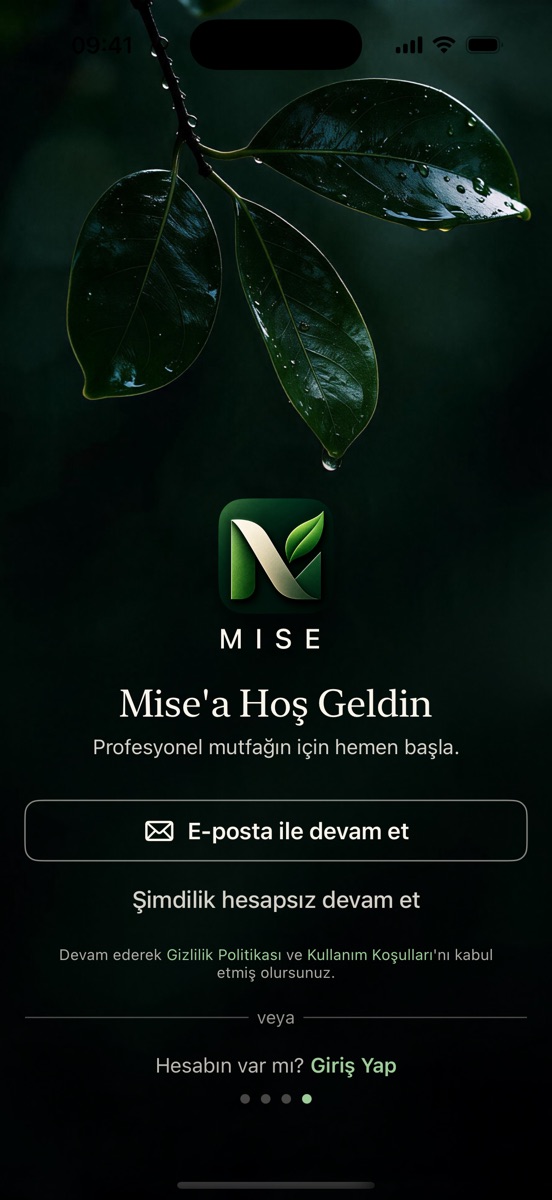
Mise'yi açtığınızda dört sayfalık kısa bir tanıtım görürsünüz; "Atla" ile geçebilirsiniz. Son sayfada e-postayla hesap açar, "Giriş Yap" ile hesabınıza girer ya da "Şimdilik hesapsız devam et" ile başlarsınız. Uygulama boş başlar: örnek sayı, örnek reçete ya da örnek fiyat yoktur. Özet ekranındaki Başlarken kartı üç adımı gösterir: malzeme ekleyin, bir belge tarayın, ilk reçetenizi oluşturun.
When you open Mise you see a four-page introduction; "Skip" moves past it. On the last page you create an account with e-mail, sign in with "Sign In" or start with "Continue without an account for now". The app starts empty: no sample numbers, recipes or prices. The Getting started card on the Overview shows three steps: add ingredients, scan a document, create your first recipe.
Hesap gerekli mi?
Do I need an account?
Maliyet, reçete, stok ve kayıtlı belgeler hesapsız ve çevrimdışı çalışır. Mise Hesabı dört şey içindir: yeni belge okumak, Sous Chef, Topluluk ve Mesajlar; aynı hesap iPhone'da ve Android'de çalışır. Hesabı Daha Fazla → Mise Hesabı altından açarsınız; e-posta doğrulaması tarayıcıda biter, sonra uygulamaya dönüp giriş yaparsınız.
Costing, recipes, stock and saved documents work without an account and offline. A Mise account is for four things: reading new documents, Sous Chef, Community and Messages; the same account works on iPhone and Android. Open it under More → Mise Account; e-mail confirmation finishes in the browser, then you return to the app and sign in.
İzinler
Permissions
Kamera ve Fotoğraflar izni yalnız belge tararken istenir. Belge okuma için ayrı bir onay kartı çıkar: görüntü Mise'nin sunucusu üzerinden Google Gemini'ye gider (bkz. Gizlilik). Sous Chef için de ayrı bir izin vardır; ikisi birbirini açmaz.
Camera and Photos permissions are requested only when you scan. Document reading has its own consent card: the image goes to Google Gemini through Mise's server (see Privacy). Sous Chef has a separate consent; neither enables the other.
2. Depo: malzemeler ve stok2. Inventory: ingredients and stock
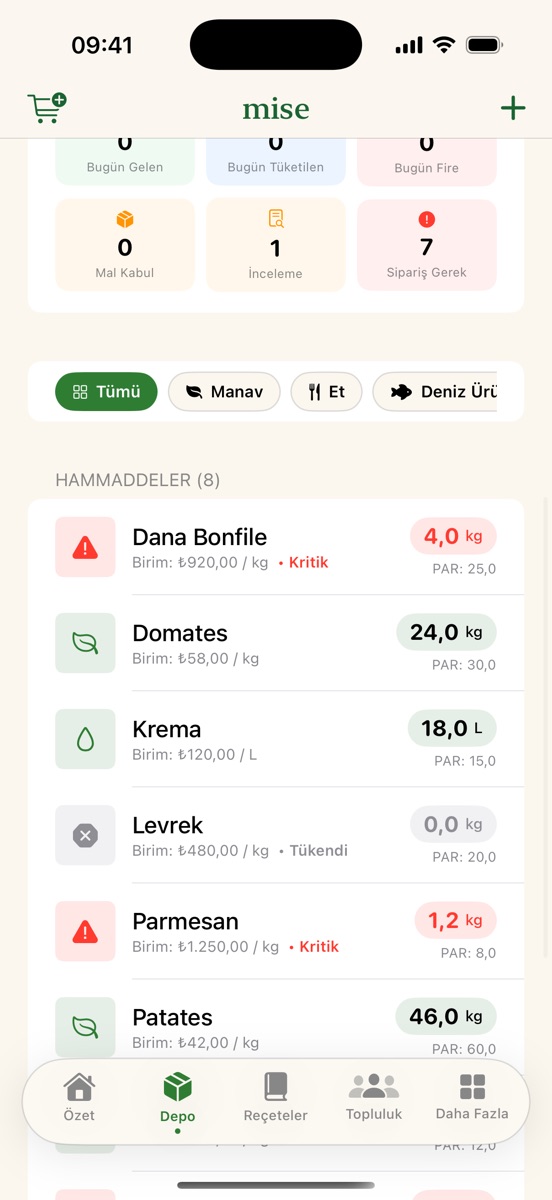
Depo sekmesi malzemelerinizin tek listesidir. Üstteki arama her zaman görünür ve ad, malzeme kodu ve tedarikçi ürün adı/koduyla arar; Manav, Et, Deniz Ürünleri gibi süzgeçler kategoriye göre daraltır.
The Inventory tab is the single list of your ingredients. The search bar is always visible and matches name, ingredient code and supplier product name/code; filters such as Produce, Meat and Seafood narrow by category.
Malzeme eklemek
Adding an ingredient
- Ad ve birim: malzemenin tutulduğu birim (kg, L, adet…). Aynı adla ikinci malzeme açılmaz; Mise kayıtlıyı önerir.
- Fiyat (isteğe bağlı): fiyat bir tedarikçiye bağlanır ve KDV durumu seçilir (dahil / hariç). KDV seçilmeden fiyatlı kayıt yapılmaz; "hariç" varsayılmaz.
- 1 paket içeriği: fiyat paket, koli, kutu ya da şişe başınaysa içeriği yazarsınız (ör. "160 g"). Mise paket fiyatını bu içerikle malzemenin birimine çevirir; içerik bilinmeden çevirmez.
- Kategori: Depo süzgeçleri bu alana bakar. Fiyat listesinden gelen malzemeler kategoriyi listede seçtiğiniz beyanla alır; "Kategorisiz malzemeleri tedarikçisine göre ata" düğmesi kalanları tek onayla dağıtır.
- Name and unit: the unit the ingredient is kept in (kg, L, pcs…). A second ingredient with the same name is not created; Mise offers the existing one.
- Price (optional): a price is tied to a supplier and needs a VAT status (included / excluded). No priced record is saved without it; "excluded" is never assumed.
- Package content: when the price is per pack, case, box or bottle you enter the content (e.g. "160 g"). Mise converts the pack price to the ingredient's unit with it and never converts without it.
- Category: the Inventory filters use it. Ingredients coming from a price list take the category you declare on the list; "Assign uncategorised ingredients by supplier" distributes the rest with one confirmation.
Stok nasıl değişir
How stock changes
Stok bir hareket defteridir: mal kabul artırır, Z raporu ve üretim düşer, fire ve sayım düzeltmesi kaydedilir. Sipariş oluşturmak stoğu artırmaz; stok yalnız mal kabulde artar. Stok Sayımı ekranında arama vardır; sayılan miktar teorik stokla karşılaştırılır ve fark tek işlemle yazılır. Minimum stok tanımlarsanız Özet'te kritik stok uyarısı çıkar ve sipariş önerisi hazırlanır.
Stock is a movement ledger: receiving adds, Z reports and production consume, waste and count corrections are recorded. Creating an order does not increase stock; only receiving does. The Stock Count screen has search; the counted quantity is compared with the theoretical stock and the difference is written in one transaction. If you define a minimum, the Overview shows a critical stock warning and prepares an order suggestion.
3. Tedarikçi ve fiyat listesi3. Suppliers and price lists
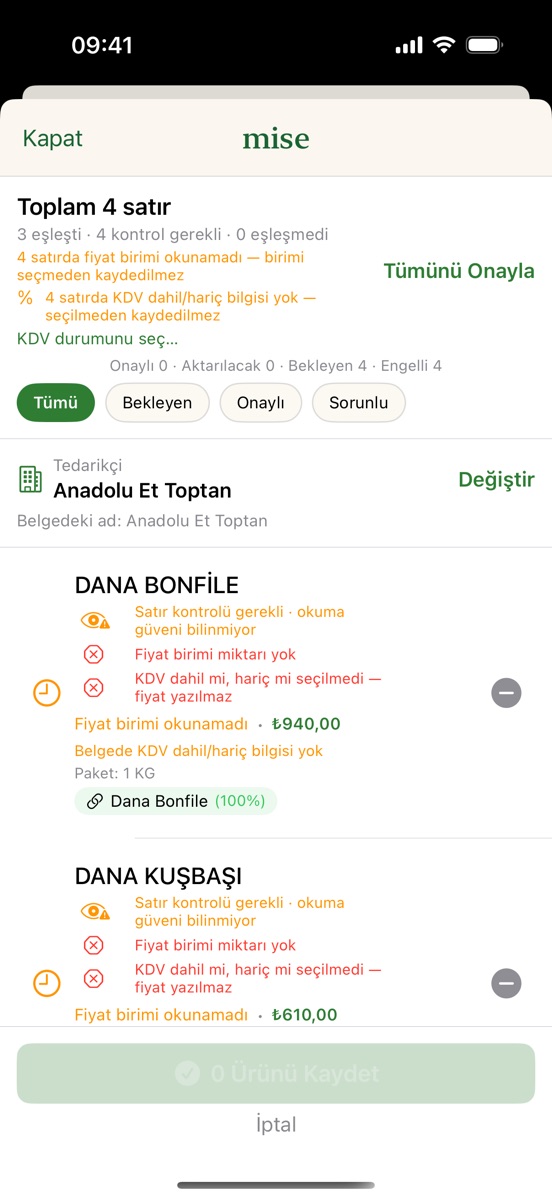
Tedarikçileri Daha Fazla → Tedarikçiler altında açarsınız; telefon numarası WhatsApp siparişi için kullanılır. Bir toptancının fiyat listesini Daha Fazla → Fiyat Listesi Yükle ile (PDF ya da fotoğraf) okutursunuz; okuma internet, Mise hesabı ve belge okuma izni ister; çok sayfalı belge sayfa sayfa okunur ve süre ekranda görünür.
Suppliers live under More → Suppliers; the phone number is used for WhatsApp orders. Import a wholesaler's price list with More → Import Price List (PDF or photo); reading needs internet, a Mise account and the document-reading consent; a multi-page document is read page by page and the elapsed time is shown.
İnceleme ekranı
The review screen
Her satır ürün adı, fiyat, fiyat birimi ve paket metniyle listelenir. Üstteki sayaçlar Onaylı · Aktarılacak · Bekleyen · Engelli durumlarını gösterir. Engelli bir satır (fiyat yok, birim tanınmadı, tutar tutmuyor) düzeltilmeden yazılmaz; düşük okuma güvenli satır "Satır kontrolü gerekli" notuyla bekler ve satır sayfasında tek başına onaylanır.
Each row lists product name, price, price unit and package text. The counters at the top show Approved · To transfer · Pending · Blocked. A blocked row (no price, unknown unit, total does not add up) is never written until fixed; a row read with low confidence waits with a "Row check needed" note and is approved on its own page.
"Tümünü Onayla" tek sayfadır
"Approve All" is one page
- Belgede okunan uygulanır: birim, paket içeriği, KDV durumu ve kategori belgeden ve tedarikçiden alınır; sayfa neyin varsayıldığını gösterir, isterseniz düzeltirsiniz.
- KDV: belgenin kendi tutarlarından anlaşılır; belge söylemiyorsa bir kez sorulur, "hariç" varsayılmaz.
- Birim: birimi okunmayan satırlar için satır satır öneri yapılır (kayıtlı malzemenin birimi, yoksa listenin birimi); hiçbir ipucu yoksa sorulur.
- Paket içeriği: "500 GR 12 AD", "30 LU", "18 LT" gibi metinler okunur ve fiyatla aynı işlemde içerik olarak kaydedilir (1 koli = 12 × 500 g). Fiyatın kolinin mi tek paketin mi olduğu belgeden anlaşılmıyorsa sorulur.
- Fiyatsız satırlar atlanır.
- What the document says is applied: unit, pack content, VAT status and category are taken from the document and the supplier; the page shows what was assumed and you can correct it.
- VAT: worked out from the document's own amounts; if the document does not tell, you are asked once and "excluded" is never assumed.
- Unit: rows whose unit was not read get a row-by-row suggestion (the saved ingredient's unit, otherwise the list's unit); with no hint at all, you are asked.
- Pack content: texts like "500 GR 12 AD", "30 LU", "18 LT" are read and saved as content in the same transaction as the price (1 case = 12 × 500 g). If the document does not show whether the price is for the case or a single pack, you are asked.
- Priceless rows are skipped.
Sonra Kaydet: kaç satırın yazılacağı, kaçının dışarıda kaldığı ve tedarikçi özetle sorulur. Fiyatlar tek işlemde yazılır ve reçete maliyeti bu fiyatlarla hemen hesaplanır; fiyat listesi stok yazmaz. Aynı belge ikinci kez kaydedilmez.
Then Save: a summary asks how many rows will be written, how many stay out and which supplier. Prices are written in one transaction and recipes are costed from them right away; a price list never writes stock. The same document is not saved twice.
4. Reçete ve maliyet4. Recipes and costing
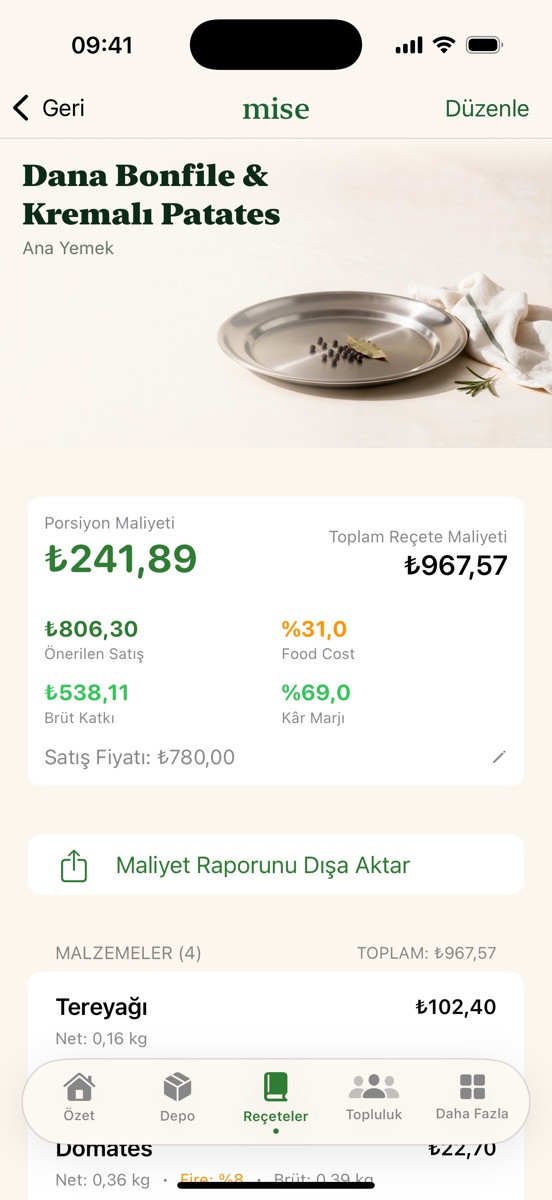
Reçeteler sekmesinde reçete adı, kategori, porsiyon ve malzeme satırlarını girersiniz (miktar + birim, isteğe bağlı fire yüzdesi). Maliyet her malzemenin güncel tedarikçi fiyatından hesaplanır; fiyat seçimi stratejisi en düşük fiyat, tercih edilen tedarikçi ya da belirli bir üründür.
On the Recipes tab you enter the name, category, portions and ingredient lines (quantity + unit, optional waste percentage). Cost is calculated from each ingredient's current supplier price; the pricing strategy is lowest price, preferred supplier or a specific product.
Eksik fiyat ve dönüşüm
Missing prices and conversions
Bir malzemenin fiyatı yoksa reçete toplamı kesin değil diye işaretlenir; Mise tahmini toplam vermez. Fiyat koli, paket ya da adet başınaysa Mise paket içeriğini belgedeki metinden okur ve hemen hesaplar; satırda "Belgeden: 1 paket = 720 g" gibi bir not ve düzeltme yolu görünür. Metinde ölçü yoksa satır "Paket içeriği doğrulanmalı: 1 koli kaç adet?" diye sorar; katsayı uydurulmaz. Koli → adet → gram zinciri de desteklenir: 12 × 500 g koli 600 ₺ ise 30 g için 3 ₺. Farklı para birimindeki fiyatlar toplanmaz, kur çevrilmez; mutfağın para birimini (₺, $, €, £) Ayarlar'dan seçersiniz.
If an ingredient has no price, the recipe total is flagged not exact; Mise gives no estimated total. When the price is per case, pack or piece, Mise reads the pack content from the document text and calculates right away; the line shows a note such as "From the document: 1 pack = 720 g" and a way to correct it. If the text has no measure, the line asks "Package content must be verified: how many pieces in 1 case?"; no factor is invented. The case → piece → gram chain is supported too: a 12 × 500 g case at 600 ₺ gives 3 ₺ for 30 g. Prices in different currencies are never added together and no exchange rate is applied; you choose the kitchen currency (₺, $, €, £) in Settings.
Satır düzenleme ve içerik düzeltme
Editing lines and fixing content
Bir reçete satırını sola kaydırıp Düzenle ile miktar, birim ve fiyat stratejisini değiştirirsiniz. Yanlış bir paket içeriğini malzeme sayfasındaki İçeriği düzelt ile düzeltirsiniz; sayfa mevcut değerle açılır. Maliyet raporunu CSV ya da PDF olarak dışa aktarmak Premium'dadır.
Swipe a recipe line left and choose Edit to change quantity, unit and pricing strategy. Fix a wrong package content with Fix content on the ingredient page; it opens with the current value. Exporting the recipe cost report as CSV or PDF is a Premium feature.
5. Belge okuma ve Mal Kabul5. Document reading and receiving
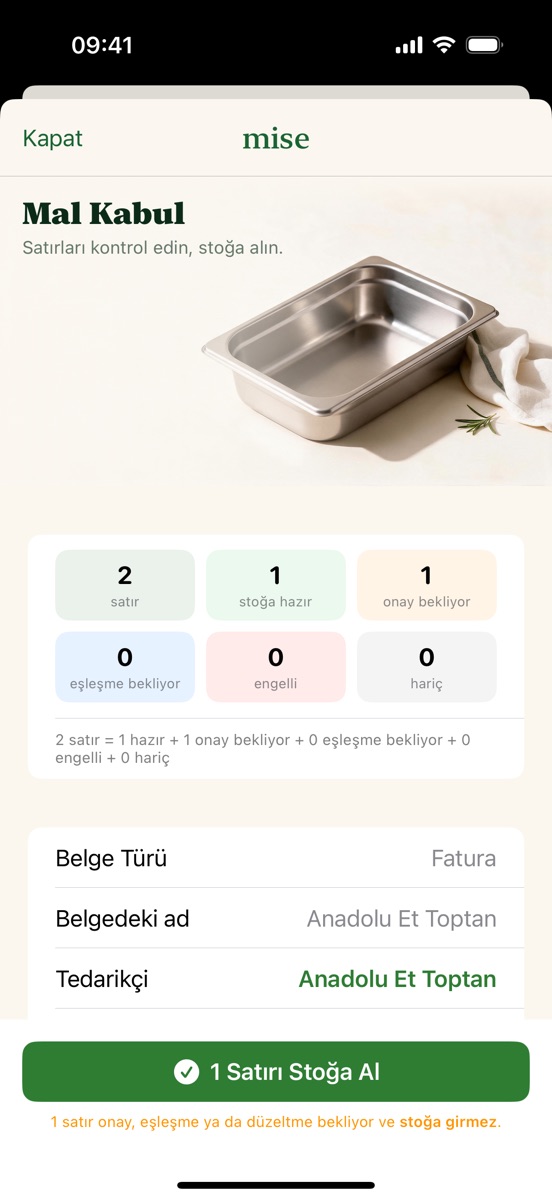
Belge Tara ile fatura, irsaliye, fiş, Z raporu ve fiyat listesini kameradan, fotoğraftan ya da PDF'ten okutursunuz. Yeni belge okumak internet, Mise hesabı ve belge okuma izni ister; görüntü Mise'nin sunucusu üzerinden Google Gemini'ye gider ve saklanmaz. Okuma sırasında stilize bir belge görseli ve adım metinleri görünür; okunamayan alan boş kalır. Belge türünden emin olunamazsa Mise türü size sorar ve seçiminiz her zaman öndedir.
With Scan Document you read invoices, delivery notes, receipts, Z reports and price lists from the camera, a photo or a PDF. Reading a new document needs internet, a Mise account and the document-reading consent; the image goes through Mise's server to Google Gemini and is not stored. During reading a stylised document graphic and step captions are shown; unreadable fields stay empty. If the document type is uncertain Mise asks you, and your choice always wins.
Mal Kabul
Receiving
- Her satır ürün adı, miktar, birim ve fiyatla gelir; miktar × fiyat tutarla denetlenir.
- Tümünü Onayla (N) tek adımdır: eşleşmeyen satırlar için "malzeme aç" beyanı + kategori seçersiniz; aynı adlı kayıt varsa ona bağlanır, yoksa fiyatsız yeni malzeme açılır ve uygun satırlar onaylanır.
- Düşük okuma güveni bir engel değil, nottur; iki okuma arasındaki fark ya da aritmetik uyuşmazlığı karar ister.
- Stok yalnız Stoğa Al ile yazılır ve yalnız hazır satırlar girer; kaç satırın yazılacağı ve dışarıda kalacağı önceden söylenir. Aynı belge ikinci kez stoğa girmez.
- Each line arrives with product name, quantity, unit and price; quantity × price is checked against the total.
- Approve All (N) is one step: for unmatched lines you declare "create ingredient" and pick a category; a record with the same name is linked, otherwise a priceless new ingredient is created, and eligible lines are approved.
- Low reading confidence is a note, not a blocker; a difference between two readings or an arithmetic mismatch asks for a decision.
- Stock is written only with Receive into Stock, and only ready lines go in; how many will be written and left out is stated beforehand. The same document never enters stock twice.
Tedarikçi belgeden otomatik seçilmez; kayıtlı bir tedarikçi seçersiniz ve isterseniz belge başlığındaki adı o tedarikçi için hatırlatırsınız.
The supplier is not picked from the document automatically; you choose a registered supplier and can ask Mise to remember the document's header name for it.
6. Z raporu ve satış düşümü6. Z reports and sales depletion
Günlük Z ya da satış raporunu tarattığınızda ürün satırları (ad, adet, tutar) belge sırasıyla listelenir. Adet ya da tutar okunamadıysa satır listede kalır ama tüketime katılmaz; tutarı düzeltebilir, satırı çıkarabilir ya da geri alabilirsiniz. Her satır bir reçeteye eşlenir; reçetesi olmayan satır tahminle düşülmez.
When you scan the daily Z or sales report, the product lines (name, quantity, amount) are listed in document order. If quantity or amount could not be read, the line stays but does not count towards consumption; you can fix the amount, exclude the line or restore it. Each line is matched to a recipe; a line without a recipe is never depleted by guesswork.
Onay diyaloğu toplam ciroyu gösterir ("Toplam ciro … stoktan düşülsün mü?"); rapor toplamı ile satır toplamı arasındaki fark tutarıyla yazılır. Onaydan sonra reçetelerin malzemeleri tek işlemle stoktan düşer. İşlenmiş raporların cirosu Bu Ay kartına girer.
The confirmation dialog shows the total revenue ("Total revenue … deduct from stock?"); the difference between the report total and the line total is shown as an amount. After confirmation the recipes' ingredients are deducted from stock in one transaction. Revenue of processed reports feeds the This Month card.
7. Sipariş ve WhatsApp7. Orders and WhatsApp
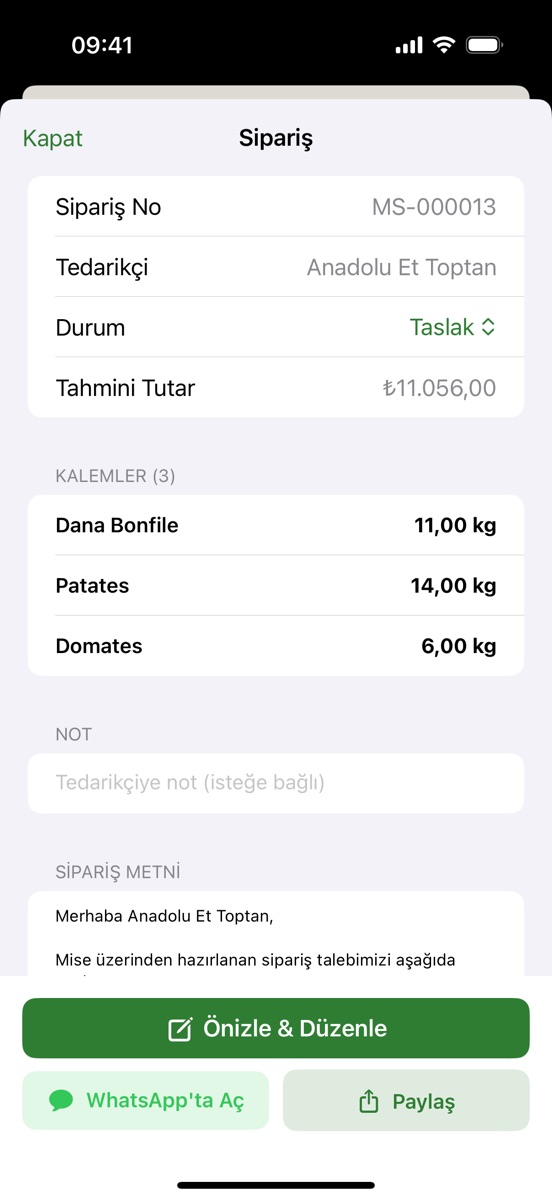
Daha Fazla → Satın Alma & Siparişler minimum stoğun altına düşen malzemelerden tedarikçi bazında sipariş önerisi hazırlar. Taslak siparişi Önizle & Düzenle ile miktar, kalem ve notla düzenler, sonra WhatsApp'ta Aç ile tedarikçinin kayıtlı numarasına hazır metinle sohbeti açarsınız. Mise mesajı göndermez; Gönder'e siz basarsınız. Metinde tutar yoktur; beklenen fiyat bir teklif değildir.
More → Purchasing & Orders prepares supplier-based order suggestions from ingredients below their minimum. Edit the draft with Preview & Edit (quantities, items, note), then Open in WhatsApp opens the chat with the supplier's registered number and the prepared text. Mise never sends the message; you press Send. The text carries no amounts; an expected price is not an offer.
Sipariş "gönderildi" işaretini alır; teslimat gelince faturayı tarayıp mal kabulle stoğa alırsınız.
The order is marked "sent"; when the delivery arrives you scan the invoice and receive it into stock.
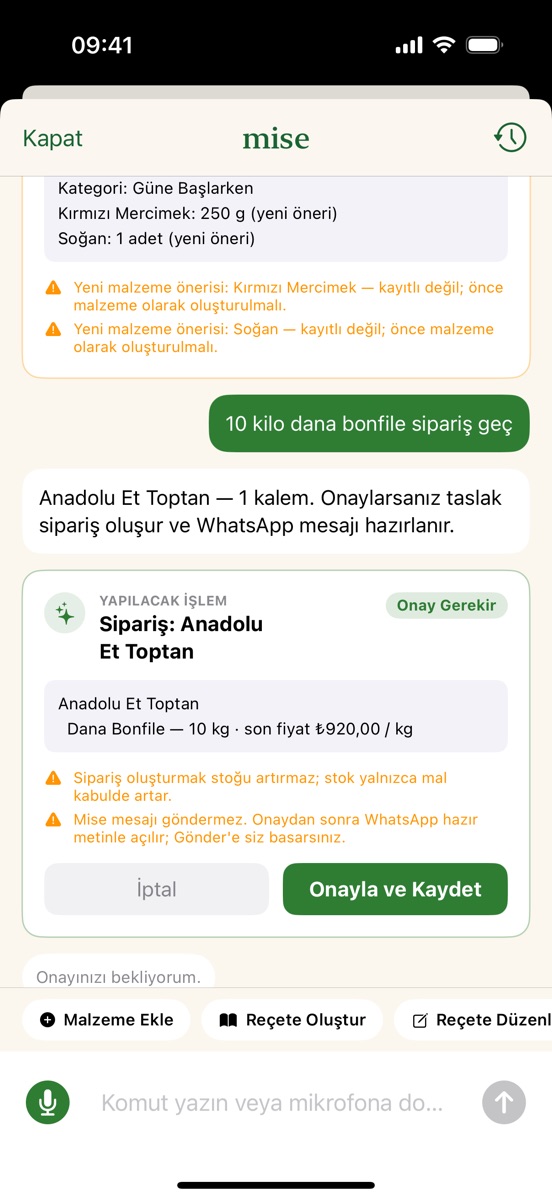
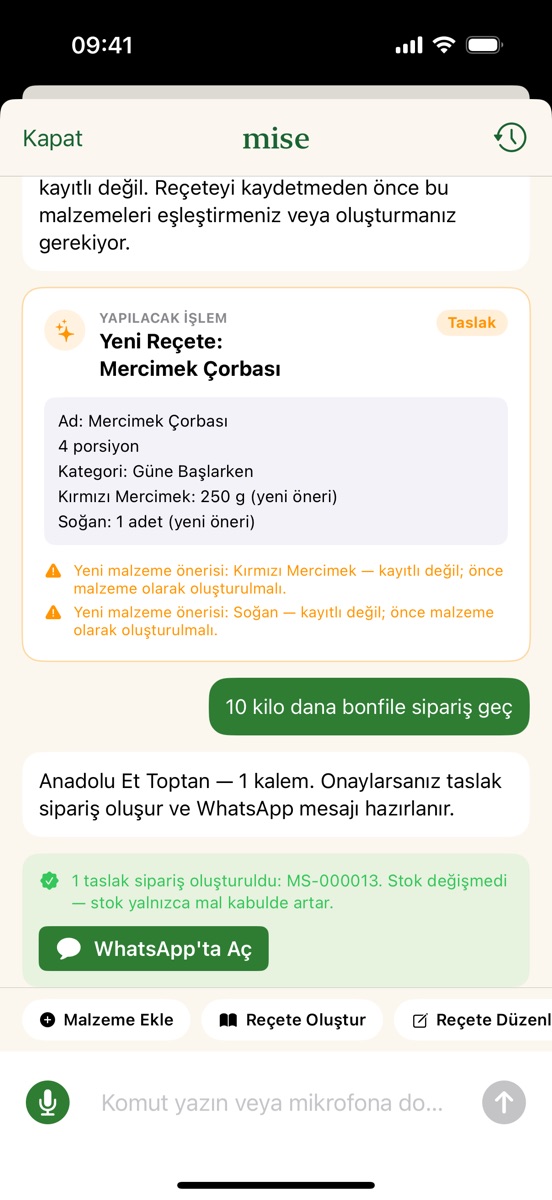
Sous Chef ile sipariş: "Metro'dan 10 kilo dana bonfile sipariş geç" deyin. Satırlar yalnız kayıtlı malzemelere açılır; tedarikçiyi söylediyseniz birebir kayıt kullanılır, söylemediyseniz malzemenin kayıtlı tedarikçi ürünü esas alınır, o da yoksa taslak tedarikçisiz açılır ve bu söylenir. Miktar ya da birim eksikse Mise sorar. Onaydan sonra taslak sipariş oluşur, stok değişmez ve sonuç kartında WhatsApp'ta Aç çıkar.
Ordering with Sous Chef: say "order 10 kilos of beef tenderloin from Metro". Lines are opened only for registered ingredients; if you name the supplier the exact record is used, otherwise the ingredient's registered supplier product, and if there is none the draft opens without a supplier and says so. If quantity or unit is missing, Mise asks. After confirmation a draft order is created, stock is unchanged and the result card shows Open in WhatsApp.
8. Mise Sous Chef8. Mise Sous Chef
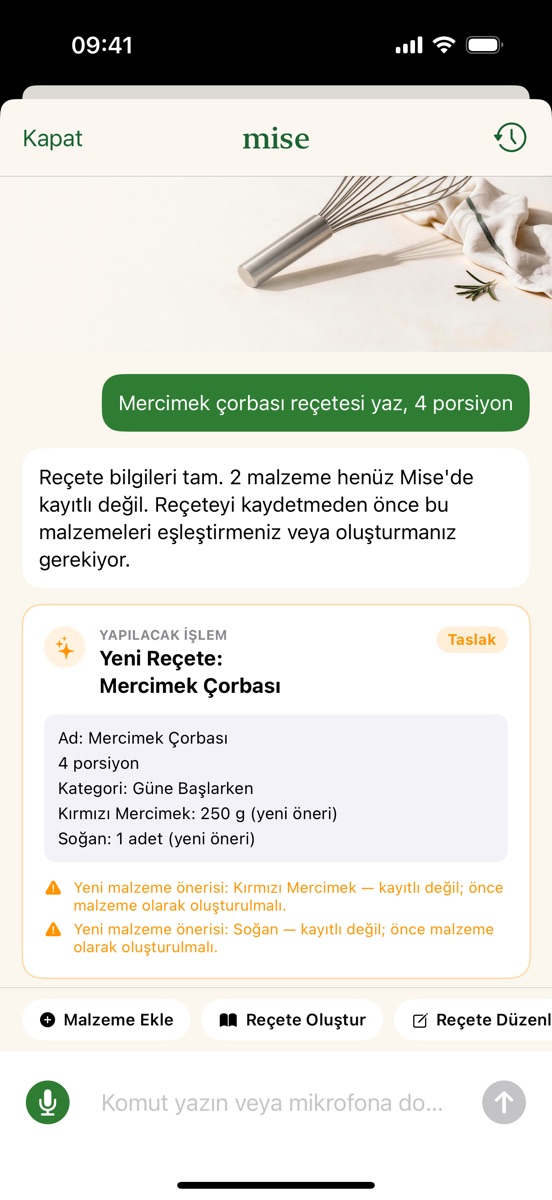
Sous Chef Google Gemini ile çalışır ve yalnız öneri hazırlar; internet, Mise hesabı ve Sous Chef izni ister. Yapabildikleri: yeni malzeme (fiyatı ve tedarikçisiyle), yeni reçete, mevcut reçetede değişiklik, sipariş, fire ve sayım taslağı, dönem raporu (bugün, bu hafta, bu ay, geçen ay ya da tarih aralığı), stok ve eksik fiyat soruları, reçete maliyeti açıklaması ve genel mutfak sorularına cevap.
Sous Chef runs on Google Gemini and only prepares proposals; it needs internet, a Mise account and the Sous Chef consent. It can: create an ingredient (with price and supplier), create a recipe, edit an existing recipe, draft orders, waste and counts, produce a period report (today, this week, this month, last month or a date range), answer stock and missing-price questions, explain a recipe cost and answer general kitchen questions.
- Rakamları Gemini değil Mise hesaplar; rapor rakamları kendi kayıtlarınızdan gelir.
- Eksik bilgi tek tek sorulur: ad → birim → fiyat → tedarikçi → KDV. "Metro'dan domates, kilosu 40 lira, KDV dahil" tek cümlede tamamlanır.
- Hiçbir kayıt onaysız yazılmaz; aynı onay ikinci kez uygulanmaz.
- Sesli konuşmayı Ayarlar'dan açarsınız; söyledikleriniz metne çevrilir ve ses kaydı Gemini'ye gitmez. Doğal sesli yanıt Premium'dadır; bunun için cevap metni ElevenLabs'e gider.
- Gemini'ye ulaşılamazsa neden ekranda söylenir ve tek bir "Tekrar dene" sunulur.
- Numbers are calculated by Mise, not Gemini; report figures come from your own records.
- Missing information is asked one item at a time: name → unit → price → supplier → VAT. "Tomatoes from Metro, 40 lira per kilo, VAT included" completes in one sentence.
- Nothing is written without confirmation; the same confirmation is never applied twice.
- Voice conversation is enabled in Settings; what you say is turned into text and no audio recording goes to Gemini. Natural-voice spoken replies are Premium; for them the reply text goes to ElevenLabs.
- If Gemini cannot be reached the reason is shown and a single "Try again" is offered.
9. Özet, Bu Ay ve raporlar9. Overview, This Month and reports
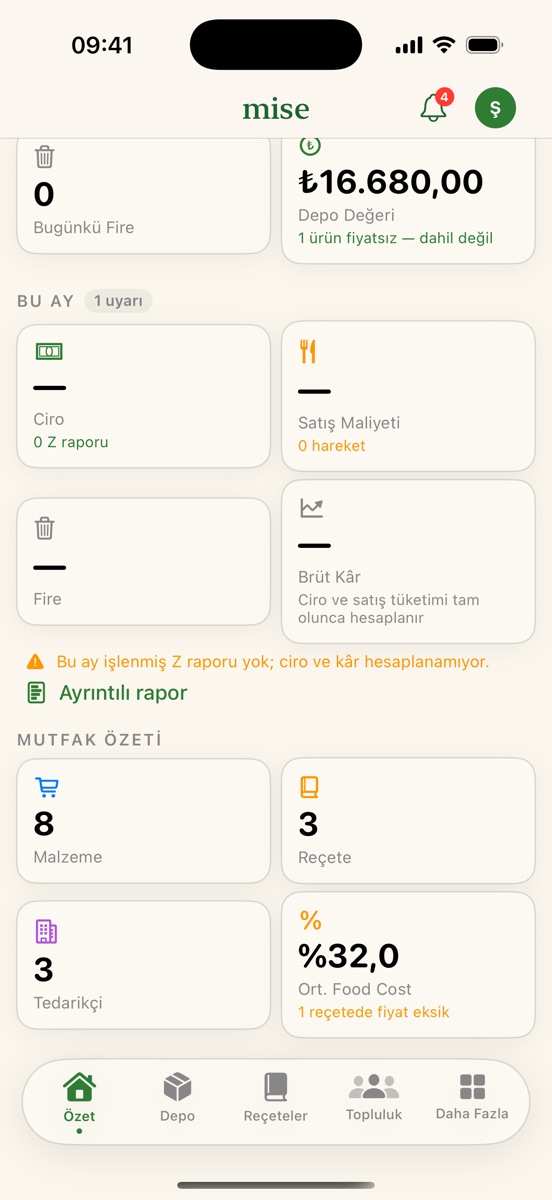
Özet sekmesi günün durumunu toplar: bugünkü mal kabul, açık sipariş, fire, depo değeri, kritik stok ve dikkat gerektiren belgeler. Zil simgesi bildirim merkezini açar.
The Overview tab gathers the day: today's receiving, open orders, waste, stock value, critical stock and documents that need attention. The bell opens the notification centre.
Bu Ay
This Month
- Ciro yalnız stoğa işlenmiş Z/satış raporlarının okunan toplamından gelir.
- Satış maliyeti ve fire hareket defterinden; alım tutarı bilinmeyen hareket varsa toplam "≥" ile alt sınır olarak gösterilir.
- Brüt kâr = ciro − satış maliyeti; gerçekleşen food cost hedefinizle birlikte yazılır.
- Karşılaştırma geçen ayın aynı dönemiyle yapılır; yarım ay tam ayla kıyaslanmaz.
- Uyarılar: food cost hedefin üzerinde, fire alımların %5'ini aşıyor, ciro geçen ayın aynı dönemine göre %20 ve daha fazla düştü, hareket var ama işlenmiş Z raporu yok.
- Revenue comes only from the read totals of Z/sales reports that were processed into stock.
- Cost of sales and waste come from the movement ledger; if a movement has no known amount the total is shown as a lower bound with "≥".
- Gross profit = revenue − cost of sales; the realised food cost is shown next to your target.
- Comparison is with the same period of last month; a half month is never compared with a full one.
- Alerts: food cost above target, waste above 5% of purchases, revenue down 20% or more against the same period last month, movements without a processed Z report.
Ayrıntılı rapor (Daha Fazla → Raporlar) 7 / 30 / 90 günlük dönem hareketlerini, depo değerini, fiyat değişimlerini, tedarikçi farklarını, fiyatı bilinmeyen ürünleri ve sipariş sayılarını verir.
Detailed report (More → Reports) gives 7 / 30 / 90-day movements, stock value, price changes, supplier differences, unpriced products and order counts.
10. Ayarlar ve Premium10. Settings and Premium
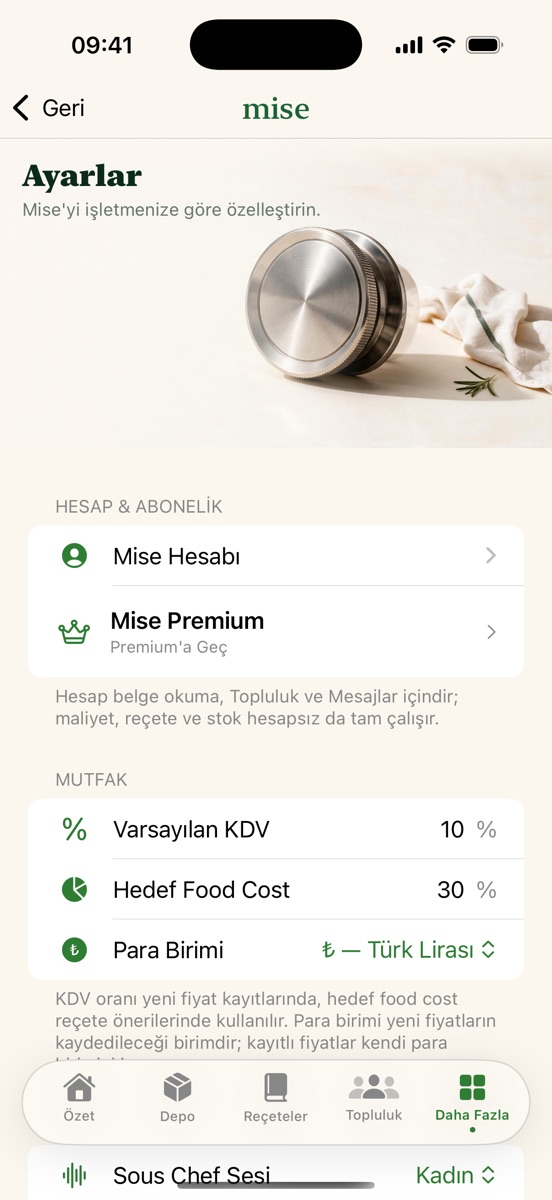
- Mutfak: varsayılan KDV oranı yeni fiyat kayıtlarında, hedef food cost reçete önerilerinde ve Bu Ay uyarısında kullanılır; para birimi (₺, $, €, £) yeni fiyatlara uygulanır, eski fiyatlar kendi para biriminde kalır. Kaydet yalnız değişiklik varken görünür.
- Mise Sous Chef: ses seçimi, sesli karşılıklı konuşma, Gemini izni ve geri çekme.
- Belge Okuma: bulut belge işleme izninin durumu, verme ve geri çekme; gizlilik politikası bağlantısı.
- Dil ve tema: Türkçe / English / Sistem; açık, koyu ya da sistem teması.
- Veri Yönetimi: cihazda ne tutulduğunu görür, kategori bazında ya da Tüm Verilerimi Sil ile tamamını silersiniz (iki onay). Hesap, abonelik ve izinler silinmez.
- Yardım ve Tanı: Yardım → Sorun Bildir sürüm, cihaz ve donma günlüğüyle hazırlanmış bir destek e-postası açar. Tanı donma günlüğünü gösterir; günlük yalnız cihazda durur.
- Kitchen: the default VAT rate is used for new price records, the target food cost for recipe suggestions and the This Month alert; the currency (₺, $, €, £) applies to new prices, while older prices keep their own currency. Save appears only when something changed.
- Mise Sous Chef: voice choice, voice conversation, Gemini permission and withdrawal.
- Document Reading: the cloud document permission status, granting and withdrawing it; a privacy policy link.
- Language and theme: Turkish / English / System; light, dark or system theme.
- Data Management: see what is kept on the device and delete by category or everything with Delete All My Data (two confirmations). Account, subscription and permissions are not deleted.
- Help and Diagnostics: Help → Report a Problem opens a support e-mail prefilled with the version, device and freeze diary. Diagnostics shows the freeze diary; it stays on the device.
Premium ve satın almayı geri yükleme
Premium and restoring purchases
Ücretsiz planda 5 reçete, 20 malzeme ve 1 tedarikçi eklenebilir; ayrıca hesap başına toplam 2 başarılı belge okuma ve ayda 20 Sous Chef mesajı vardır. Mise Premium, App Store ya da Google Play üzerinden aylık veya yıllık otomatik yenilenen bir aboneliktir ve bu sınırları kaldırır: belge okuma, Sous Chef ve sesli yanıt sınırsız olur, maliyet raporu CSV ve PDF olarak dışa aktarılır. Ücretsiz deneme süresi yoktur. Maliyet, reçete ve stok kayıtları ücretsiz planda da sınırlar içinde tam çalışır. Fiyatlar ve dönemler doğrudan App Store ya da Google Play'den gelir; iPhone'da Apple teklif kodunu paywall'daki Kod Kullan ile girersiniz. Yeni cihazda ya da yeniden kurulumda Satın Alımları Geri Yükle ile aboneliğinizi geri alırsınız; abonelik Apple Kimliği → Abonelikler (Android'de Google Play → Abonelikler) ekranından yönetilir.
The free plan allows 5 recipes, 20 ingredients and 1 supplier, plus 2 successful document reads per account in total and 20 Sous Chef messages a month. Mise Premium is a monthly or yearly auto-renewing subscription through the App Store or Google Play and removes those limits: document reading, Sous Chef and spoken replies become unlimited, and the recipe cost report can be exported as CSV and PDF. There is no free trial. Costs, recipes and stock work fully on the free plan within its limits. Prices and periods come directly from the App Store or Google Play; on iPhone you can enter an Apple offer code with Redeem Code on the paywall. On a new device or after reinstalling, use Restore Purchases to recover your subscription; subscriptions are managed under Apple ID → Subscriptions (on Android, Google Play → Subscriptions).
11. Gizlilik ve veri11. Privacy and data
- Belge görüntüsü, izin verdiyseniz, Mise'nin sunucusu üzerinden Google'ın Gemini API'sine gider; Mise'nin sunucusu görüntüyü veritabanına ya da depolamaya yazmaz. İzin, internet ya da hesap yoksa yeni belge okunmaz; kayıtlı veri çevrimdışı çalışır.
- Sous Chef'e yazdığınız cümle, ekrandaki son konuşma turları ve varsa devam eden taslağın alanları Gemini'ye gider; stok, fiyat, tedarikçi ve belge kayıtlarınız gönderilmez.
- Mutfak verileriniz cihazda durur; Topluluk ve Mesajlar hesapla sunucuda tutulur. Toplulukta gönderi, yorum, beğeni, takip, mesaj ve CV ile portfolyolu şef profili vardır; görünürlük Herkese Açık ya da Sadece Takipçiler seçilir; kullanıcıyı engelleyebilir, şikâyet edebilir ya da sessize alabilirsiniz. Mesaj, beğeni, yorum ve yeni takipçi için anlık bildirim gelir. Mesajlar uçtan uca şifreli değildir.
- Bu cihazdaki verileri Tüm Verilerimi Sil siler. Hesabınızı uygulama içinden (Daha Fazla → Mise Hesabı → Hesabımı Sil) ya da misecost.com/delete-account sayfasından silebilirsiniz; yalnız bazı verilerin silinmesi için aynı sayfanın veri silme bölümü vardır. Hesap silmek aboneliği iptal etmez; abonelik App Store'da ya da Google Play'de iptal edilir. Ayrıntılar Gizlilik Politikası'nda.
- With your permission, a document image goes to Google's Gemini API through Mise's server; Mise's server never writes the image to a database or storage. Without permission, internet or an account no new document is read; saved data works offline.
- The sentence you write to Sous Chef, the recent conversation turns on screen and, if any, the fields of the draft in progress go to Gemini; your stock, price, supplier and document records are not sent.
- Your kitchen data stays on the device; Community and Messages are stored on the server with your account. Community has posts, comments, likes, follows, messages and a chef profile with CV and portfolio; visibility is Everyone or Followers Only; you can block, report or mute a user. Push notifications arrive for messages, likes, comments and new followers. Messages are not end-to-end encrypted.
- Delete All My Data erases the data on this device. You can delete your account inside the app (More → Mise Account → Delete My Account) or at misecost.com/delete-account; the same page has a data deletion section for removing only some data. Deleting the account does not cancel the subscription; cancel it in the App Store or Google Play. Details in the Privacy Policy.
Aradığınızı bulamadınız mı? Destek sayfasından yazın: support@misecost.com.
Could not find what you were looking for? Write from the Support page: support@misecost.com.